
Puja Item Photography Tips for Better Sales
Learn how to categorise puja items the right way — by ritual, material, and deity — for faster browsing and a smoother online shopping experience.
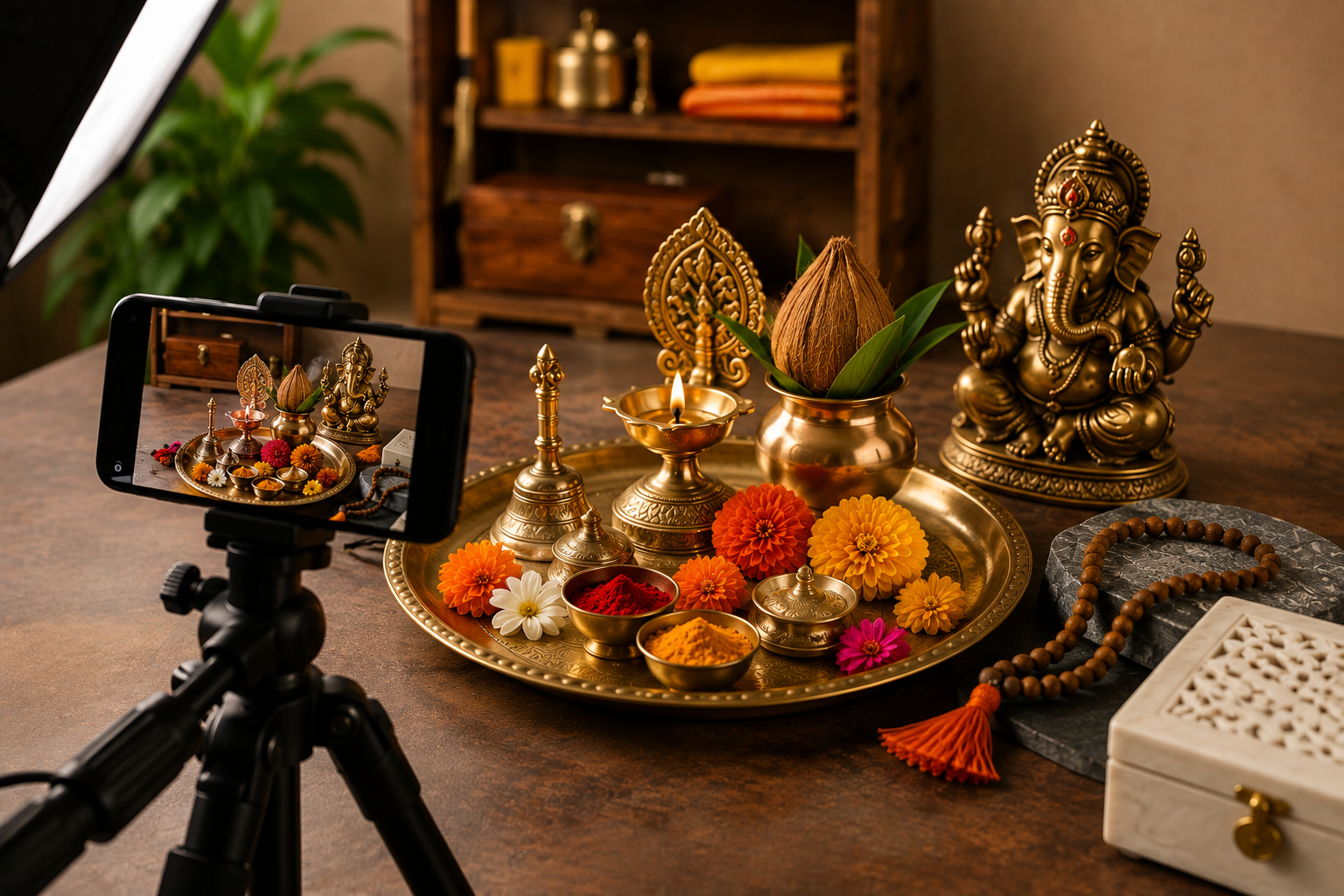
Unlike clothing or electronics, puja items carry emotional and spiritual weight. A customer buying a brass Ganesh idol or a copper kalash is often making a purchase tied to a festival, a new home, or a personal ritual. They cannot touch or inspect the item before buying, so the photograph becomes their only way to judge:
Whether the brass or copper is genuine and well-finished
Whether the idol's carving and proportions look correct
Whether the item matches the size and colour described
Whether the seller is trustworthy enough to buy from
Good photography does not just decorate a listing — it directly reduces buyer hesitation, which lowers cart abandonment and return requests.
Whether the brass or copper is genuine and well-finished
Whether the idol's carving and proportions look correct
Whether the item matches the size and colour described
Whether the seller is trustworthy enough to buy from
Lighting: The Single Most Important Factor
Lighting decides whether metal looks premium or dull, and whether an idol's features are visible or lost in shadow.
Natural Light Works Best for Most Sellers
Shooting near a window with indirect daylight — not direct sun — gives soft, even lighting that flatters brass and copper surfaces without harsh glare. Late morning or early afternoon light tends to be the most consistent.
Avoid These Common Lighting Mistakes
Direct flash: Creates a bright white hotspot on metallic surfaces, hiding texture and detail.
Mixed light sources: Combining yellow indoor bulbs with daylight causes an odd colour cast in photos.
Harsh midday sun: Produces strong shadows that can make idols look uneven or the metal look overly reflective.
Direct flash: Creates a bright white hotspot on metallic surfaces, hiding texture and detail.
Mixed light sources: Combining yellow indoor bulbs with daylight causes an odd colour cast in photos.
Harsh midday sun: Produces strong shadows that can make idols look uneven or the metal look overly reflective.
A Simple Budget Setup
A white bedsheet or tracing paper taped over a window acts as a natural diffuser. For sellers who photograph regularly, an inexpensive ring light or softbox (available for a few hundred rupees online) gives consistent results regardless of the weather or time of day.
Choosing the Right Background
The background should support the product, not distract from it.
Best Background Options
Plain white or off-white surface — works well for most idols, diyas, and copper items; keeps focus entirely on the product
Light wooden texture — adds warmth and suits traditional items like Rudraksha malas or wooden puja stands
Soft beige or cream cloth — gives a premium, boutique feel for higher-value items like silver or gold-plated pieces
Plain white or off-white surface — works well for most idols, diyas, and copper items; keeps focus entirely on the product
Light wooden texture — adds warmth and suits traditional items like Rudraksha malas or wooden puja stands
Soft beige or cream cloth — gives a premium, boutique feel for higher-value items like silver or gold-plated pieces
Backgrounds to Avoid
Busy patterns or cluttered household surfaces
Strong colours that clash with brass or copper tones (bright red or green backgrounds tend to overpower the product)
Uneven or wrinkled cloth, which looks unprofessional in close-up shots
Busy patterns or cluttered household surfaces
Strong colours that clash with brass or copper tones (bright red or green backgrounds tend to overpower the product)
Uneven or wrinkled cloth, which looks unprofessional in close-up shots
Camera Angles That Actually Sell
Different puja items need different angles to show what matters most to a buyer.
For Idols and Statues
Front-facing, eye-level shot as the main image — this is how the idol will typically be viewed once placed at home
Slight three-quarter angle to show depth and carving detail
Back view, especially if the idol has design work on the reverse side
Front-facing, eye-level shot as the main image — this is how the idol will typically be viewed once placed at home
Slight three-quarter angle to show depth and carving detail
Back view, especially if the idol has design work on the reverse side
For Puja Kits and Combo Products
Flat lay (top-down) shots work best, arranging all included items neatly so the buyer can see everything included at a glance
One "in-box" shot showing how the kit is packaged, which builds confidence about presentation on delivery
Flat lay (top-down) shots work best, arranging all included items neatly so the buyer can see everything included at a glance
One "in-box" shot showing how the kit is packaged, which builds confidence about presentation on delivery
For Malas, Rudraksha, and Jewellery-Type Items
Close-up macro shots to show bead texture, knotting, and finish
A shot with scale reference (placed next to a coin or ruler, or worn/draped) so buyers can judge actual size
Close-up macro shots to show bead texture, knotting, and finish
A shot with scale reference (placed next to a coin or ruler, or worn/draped) so buyers can judge actual size
For Copper and Brass Vessels
Slightly elevated angle showing both the opening and the body of the vessel
A reflection-controlled close-up of any engraved or embossed detailing
Slightly elevated angle showing both the opening and the body of the vessel
A reflection-controlled close-up of any engraved or embossed detailing
Styling and Composition Tips
Keep only one product (or one complete set) in frame — avoid clutter from unrelated items
Use small props sparingly: a single diya, a few flower petals, or a strand of tulsi leaves can add context without overwhelming the shot
Maintain consistent framing across your catalog so the store looks organised and professional
Clean the product thoroughly before shooting — fingerprints and dust are far more visible in photographs than in person, especially on polished metal
Keep only one product (or one complete set) in frame — avoid clutter from unrelated items
Use small props sparingly: a single diya, a few flower petals, or a strand of tulsi leaves can add context without overwhelming the shot
Maintain consistent framing across your catalog so the store looks organised and professional
Clean the product thoroughly before shooting — fingerprints and dust are far more visible in photographs than in person, especially on polished metal
Editing: What to Do and What to Avoid
Basic editing improves photos; over-editing damages trust.
Recommended Adjustments
Correct white balance so brass looks golden, not orange or grey
Slightly increase brightness and contrast if the shot looks flat
Crop tightly so the product fills most of the frame
Straighten any tilted horizon or surface lines
Correct white balance so brass looks golden, not orange or grey
Slightly increase brightness and contrast if the shot looks flat
Crop tightly so the product fills most of the frame
Straighten any tilted horizon or surface lines
What to Avoid
Heavy colour filters that misrepresent the actual shade of the material
Excessive sharpening, which can make metal look artificial
Removing natural texture or patina from copper and brass items — buyers who want an authentic look may feel misled if the delivered product looks different from the photo
Heavy colour filters that misrepresent the actual shade of the material
Excessive sharpening, which can make metal look artificial
Removing natural texture or patina from copper and brass items — buyers who want an authentic look may feel misled if the delivered product looks different from the photo
How Many Photos a Puja Item Listing Needs
A single hero image is rarely enough. A well-rounded listing typically includes:
Front view on a clean background
Alternate angle (side or three-quarter)
Close-up of texture, engraving, or finish
Size reference shot
Packaging or box shot
Lifestyle shot showing the item placed in a home puja setting, if possible
This sequence mirrors how a buyer would physically inspect the item in a store — pick it up, turn it around, check the detailing, and imagine it at home.
Front view on a clean background
Alternate angle (side or three-quarter)
Close-up of texture, engraving, or finish
Size reference shot
Packaging or box shot
Lifestyle shot showing the item placed in a home puja setting, if possible
Common Misconceptions About Product Photography
"Expensive equipment is necessary." A modern smartphone with good lighting and a steady tripod produces results good enough for most online stores.
"More filters make photos look premium." Over-processed images often look less trustworthy, not more, particularly for items where buyers want to see the true material and finish.
"One photo per product is enough." Buyers of puja items, more than most categories, want reassurance through multiple angles before committing to a purchase.
"Expensive equipment is necessary." A modern smartphone with good lighting and a steady tripod produces results good enough for most online stores.
"More filters make photos look premium." Over-processed images often look less trustworthy, not more, particularly for items where buyers want to see the true material and finish.
"One photo per product is enough." Buyers of puja items, more than most categories, want reassurance through multiple angles before committing to a purchase.
Practical Guidance for New Sellers
Start with one well-lit corner of your home near a window and standardise your setup rather than shooting in different locations
Photograph a few sample products first, review them on both mobile and desktop screens, then adjust lighting or angle before shooting your full catalog
Batch-shoot similar products together (all brass items in one session, all malas in another) to save time and maintain consistency
Keep a shot checklist so no product goes live with fewer images than another — inconsistency across a catalog can look unprofessional even if individual photos are good
Start with one well-lit corner of your home near a window and standardise your setup rather than shooting in different locations
Photograph a few sample products first, review them on both mobile and desktop screens, then adjust lighting or angle before shooting your full catalog
Batch-shoot similar products together (all brass items in one session, all malas in another) to save time and maintain consistency
Keep a shot checklist so no product goes live with fewer images than another — inconsistency across a catalog can look unprofessional even if individual photos are good
